
The platform behind every campaign we run.
One record fed by live data, the Client Hub, the first 14 days and how your data is protected, and how we compare with a typical call center. All screens use sample data.
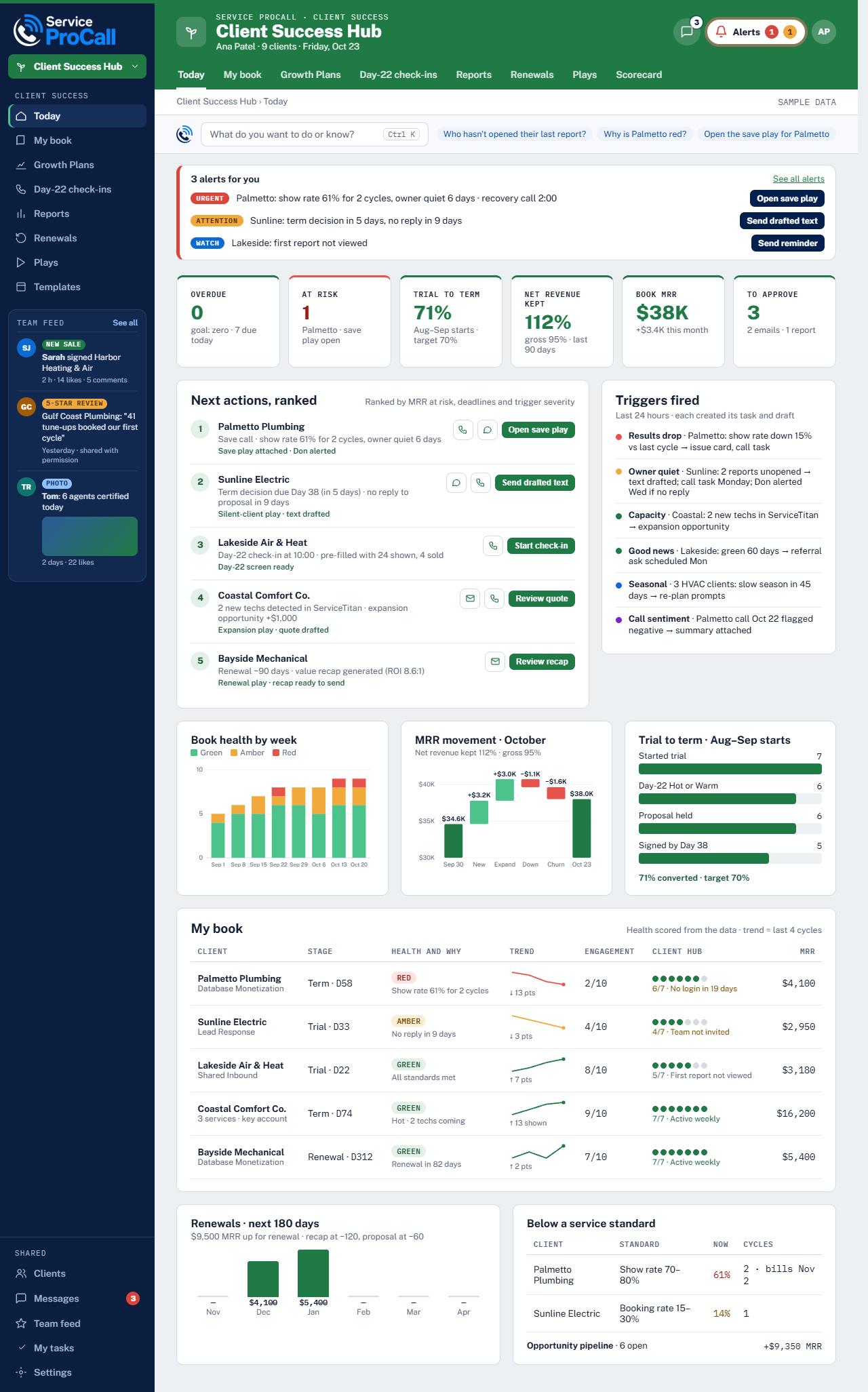
One record, start to finish
Your audit, launch, campaigns, calls, and results sit on one record every team member works from.
Problems caught the same day
A slipping show rate or a campaign behind pace raises an alert with ranked fixes — not a surprise at month end.
Every role guided daily
Each person starts with a plan built from your campaign needs, so nothing waits on someone remembering.
Results you can verify
Bookings are matched job by job to your own field service software, not to our spreadsheet.
One record, live data
One record, fed by the systems you already use.
Results flow from your field service software, our dialer, and our phones into ProCall Hub — and out to your Client Hub, your reports, and your Success Manager. No reconciling three sources of truth.
- 1
Equity Audit
We size the revenue sitting in your existing customer database.
- 2
Proposal & plan
Segments, call types, targets, and the campaign calendar.
- 3
Onboarding & integration
Your FSM connects, tracking numbers are set, data flows in.
- 4
Scripting & training
Call guidelines built per call type and approved by you.
- 5
Launch
First calls go out — your campaign is live in 14 days.
- 6
Optimize
Recordings, KPIs, and coaching refine the campaign weekly.
- 7
Review & renewal
Results reviewed together, then we scale what produced.
Ready-made setups for the platforms you already run
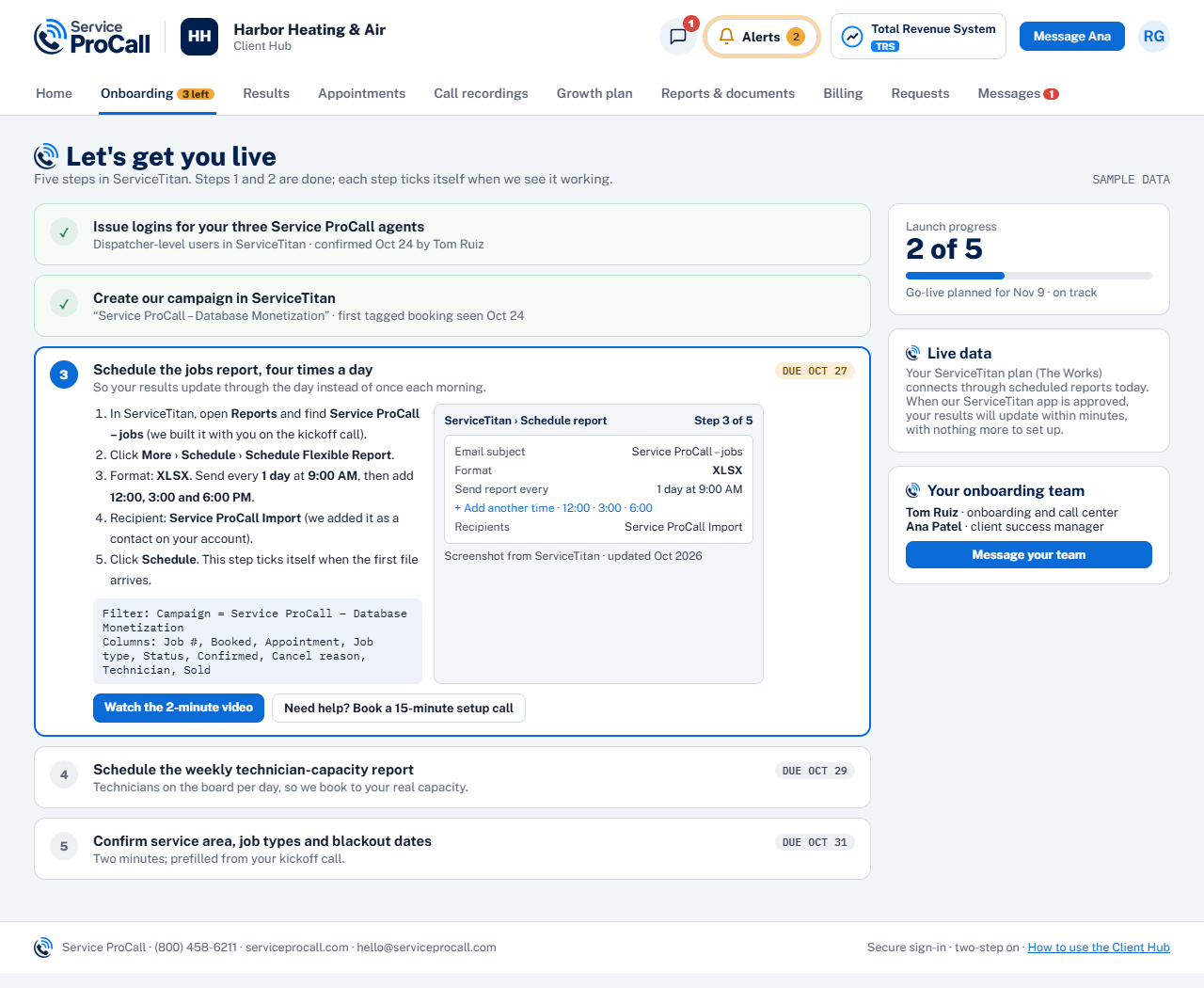
Your Client Hub
You see what we see, any time.
The Client Hub is your window into the campaign — shown appointments, sold revenue, return and show rate by cycle, and the phone app for your team. No waiting for a scheduled report.
- Live campaign status and call volume by day
- Booking rates broken down by call type
- Agent performance and quality scores
- Alerts and action items flagged for your review
- Revenue attributed to each campaign
- Your full customer database and service history
Signature to live
Live in 14 days, with you in the loop.
Onboarding is short and structured — you always know what is happening this week and what we need from you next.
Welcome & connect
Your Success Manager is assigned, your FSM integration is connected, and the campaign brief is locked.
Build
List segmentation, call guidelines, and scripting — reviewed and approved by you before a single dial.
Train
Agents train on your services, pricing, and offers. Test calls are recorded and reviewed.
Go live
The campaign launches. First results appear in your Client Hub, and early tuning begins.
How your data is protected
- Your data stays yours — exported on request, in full
- Access is limited to the team on your account, role-based
- Encrypted in transit and at rest
The team who works on your account
- Your Success Manager — strategy, reviews, and a direct line
- A dedicated campaign team — agents and their supervisor
- Quality and operations — call review and scheduling quality
Built to move fast
Agile by design, accountable by default.
When a campaign runs behind pace, ProCall Hub surfaces it with ranked fixes — and the comparison with a typical call center is built into how we operate, not just how we pitch.
Take it with you
ProCall Hub: our competitive edge.
The five-page PDF behind this tour — the platform, one record fed by live data, the Client Hub, the first 14 days, and the side-by-side comparison with a typical call center.
See it running on your campaigns.
Talk to a Success Manager about what ProCall Hub looks like for your business — and what it would surface in your first two weeks.
Book a Demo